How and when to override Android Activity's Lifecycle methods?
Explanation of a StackOverflow question regarding an Android Activity's lifecycle
Yesterday, I came across a StackOverflow question.
The OP(original poster) of the question had a scenario like this:
He made a ProgressDialog in an activity. After pressing a CardView in that activity corresponding to a meditation session, a ProgressDialog should appear for 3 seconds, and then the other activity would open - the m1 activity.
The problem he faced was - After returning to MeditationActivity, the ProgressDialog continued to show up and never stopped.
He wanted that the progress dialog is closed once the user comes back from the m1 activity to the MeditationActivity.
Just after reading the question, it should strike to the mind that one can override the default methods present in an Activity's Lifecycle and dismiss the dialog from there!
Here's how the lifecycle of an Android Activity looks like:
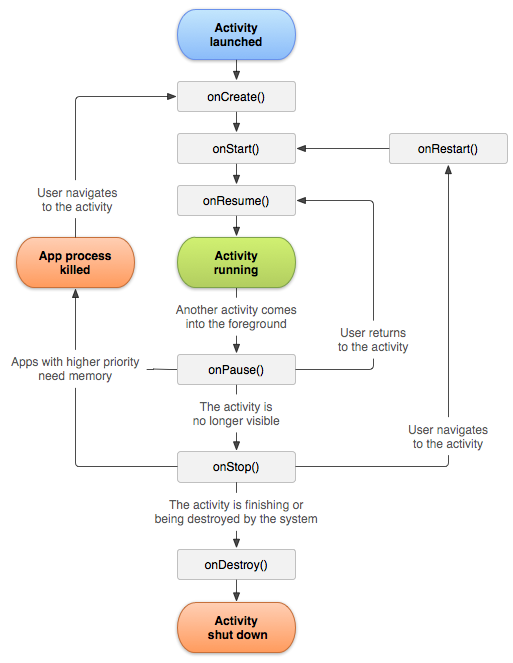
This is an image from the official android documentation
From the flowchart, we can see that it is the onResume() method that is called whenever a person comes back to the activity from another screen. So it seems to be the place where we should place the logic for dismissing the dialog!
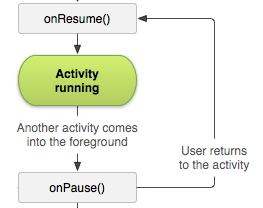
Here's how we can do that:
@Override
public void onResume(){
    super.onResume();
    if(progressDialog != null) progressDialog.dismiss();
}
The null check is placed because the progressDialog was initialized only when the person presses the CardView. And if it is initialized earlier, then there would be redundant dismissals of the progressDialog.
This was a perfect example where we could override the default lifecycle methods provided by an Android Activity to perform actions pertaining to lifecycle.
Here's my answer to the original question on StackOverflow! I'll be writing more explanations to StackOverflow Questions, so consider following me on hashnode.
I hope you find this article helpful :)
About the author
Hi there, I am Gourav, a 17 years old passionate Android developer with interests in Java, C++, python and much more.
Comments
Join the discussionI don't think I understood much (not into android dev) but Dope Article.
Thanks a lot!


